Part Number: AD620, AD620AN
Functions: Low Cost Low Power Instrumentation Amplifier
Package: DIP 8, SOIC 8 Pin Type
Manufacturer: Analog Devices ( https://www.analog.com/ )
Image:

Description
The AD620 is a low cost, high accuracy instrumentation amplifier that requires only one external resistor to set gains of 1 to 10,000. Furthermore, the AD620 features 8-lead SOIC and DIP packaging that is smaller than discrete designs and offers lower power (only 1.3 mA max supply current), making it a good fit for battery-powered, portable (or remote) applications.
Features
- Gain programmable from 1 to 10,000 with a single external resistor
- Wide supply voltage range: ±2.3V to ±18V
- Low supply current: 1.3mA max
- High common-mode rejection ratio (CMRR)
- Low offset voltage and low noise performance
- Compact 8-pin DIP and SOIC packages
- Better accuracy than discrete 3-op-amp IA solutions
- Suitable for battery-powered applications
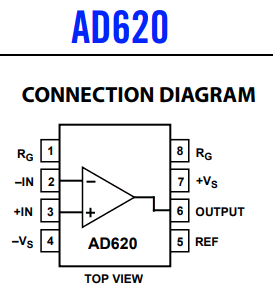
Pinouts and schematic
AD620 Voltage Amplifier Module Differential Single-Ended/Differential Small Signal Instrumentation
Arduino modules using instrumentation amplifiers (ICs) are used to measure sensor signals, amplify them appropriately and transmit them to the Arduino. Instrumentation amplifiers are high-performance offset and high-sensitivity electrical circuits specialized for measuring and amplifying small voltage differences.
The process for integrating an instrumentation amplifier into an Arduino module is as follows:
1. Connect a sensor: Select a sensor that detects the physical quantity you want to measure (temperature, pressure, etc.) and connect it to the instrumentation amplifier.
2. Instrumentation amplifier configuration: The instrumentation amplifier generally consists of three working amplifiers. Connect these amplifiers in a suitable manner to form the entire circuit.
3. Power supply: supplies power to the instrumentation amplifier. It generally consists of a positive voltage (Vcc) and a negative voltage (Vss).
4. Output connections: Connect the output of the instrumentation amplifier to the analog input pin of the Arduino.
5. Programming: Write Arduino code to interpret measured values and perform special tasks when needed.
Instrumentation amplifiers allow you to reliably measure very small signals from sensors and provide robust protection against noise or interference.
Design Notes
- Gain is set using a single external resistor between RG pins: G = 1 + (49.4kΩ / RG)
- Proper PCB layout is critical to maintain high CMRR and low noise
- Use precision resistors for gain setting to ensure accuracy
- Input shielding and filtering may be required in noisy environments
- Decoupling capacitors should be placed close to supply pins
Typical Circuit Usage
- Differential signal amplification from sensors such as strain gauges
- Front-end amplification for ADC input stages
- Bridge sensor signal conditioning circuits
- Low-level biomedical signal amplification (e.g., ECG)
- Noise-sensitive industrial measurement systems
How to Choose This Part
- Select when high precision and low noise amplification is required
- Ideal for low-power and battery-operated systems
- Suitable when adjustable gain with minimal external components is needed
- Consider input signal range and required gain accuracy
- Evaluate thermal drift and offset specifications for precision applications
Applications
- Weigh scales and load cell amplifiers
- ECG and medical instrumentation
- Transducer interfaces
- Data acquisition systems
- Industrial process control systems
- Portable and battery-powered equipment
Alternative / Equivalent Products
- INA128
- INA126
- LT1167
- AD8221
Useful Reference Site
1. https://forum.arduino.cc/t/load-cell-and-ad620-as-amplifier/342673
AD620 Pinout Datasheet File
